

Audio Loudness
Different people master assets for different purposes, and they do not agree on how loud "loud" should be. When viewers play those assets back to back, they reach for the volume control. Loudness correction fixes this during encoding.
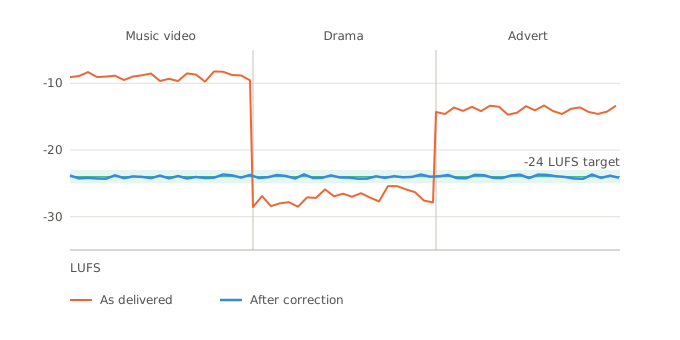
Bitmovin gives you three ways to control loudness, and which one applies depends on the codec you are encoding to.
- Dolby Loudness Filter. The newest option, and the subject of this page. It works on PCM audio before it reaches the encoder and runs in two passes, measuring the whole program first and then applying one gain change that lands it on target. Allowing special Dolby tweaks such as
Dialogue Intelligence. - EBU R128 Single Pass Filter. Also a PCM filter. It does the same job in a single pass, which means committing to a correction before it knows what comes later in the program.
-
LoudnessControlparameter. For Dolby Digital, Dolby Digital Plus and Dolby Atmos, loudness belongs to the codec configuration rather than to a filter. It can correct the audio, write loudness metadata, or both.
The Dolby Loudness Filter
Supported codecs
Attach the filter to an audio stream. The stream's output codec determines whether the filter applies.
| Output codec | Loudness handling |
|---|---|
AAC, HE_AAC_V1, Opus, PCM | Supported by this filter |
DD, DDPlus, DolbyAtmos | Not supported by the filter. Use loudnessControl in the codec configuration |
AC3, EAC3, HE_AAC_V2, Vorbis, MP3, MP2, DTS, DTS:X | Not yet supported |
Configuring the filter
Create the filter, set a target, and attach it to an audio stream.
import com.bitmovin.api.sdk.model.DolbyLoudnessContentForm;
import com.bitmovin.api.sdk.model.DolbyLoudnessDialogueIntelligence;
import com.bitmovin.api.sdk.model.DolbyLoudnessFilter;
import com.bitmovin.api.sdk.model.StreamFilter;
import java.util.Collections;

// 1. Create the filter.
DolbyLoudnessFilter filter = new DolbyLoudnessFilter();
filter.setName("Loudness correction -24 LKFS");
filter.setTargetLoudness(-24);
filter.setMaximumTruePeakLevel(-2.0);
filter.setDialogueIntelligence(DolbyLoudnessDialogueIntelligence.ENABLED);
filter.setSpeechDetectionThreshold(20);
filter.setContentForm(DolbyLoudnessContentForm.AUTO_DETECT);

DolbyLoudnessFilter createdFilter = bitmovinApi.encoding.filters.dolbyLoudness.create(filter);

// 2. Attach it to the audio stream you want corrected.
StreamFilter streamFilter = new StreamFilter();
streamFilter.setId(createdFilter.getId());
streamFilter.setPosition(0);

bitmovinApi.encoding.encodings.streams.filters.create(
    encodingId, audioStreamId, Collections.singletonList(streamFilter));
from bitmovin_api_sdk import (
DolbyLoudnessContentForm,
DolbyLoudnessDialogueIntelligence,
DolbyLoudnessFilter,
StreamFilter,
)
# 1. Create the filter.
dolby_loudness_filter = DolbyLoudnessFilter(
name='Loudness correction -24 LKFS',
target_loudness=-24,
maximum_true_peak_level=-2.0,
dialogue_intelligence=DolbyLoudnessDialogueIntelligence.ENABLED,
speech_detection_threshold=20,
content_form=DolbyLoudnessContentForm.AUTO_DETECT,
)
created_filter = bitmovin_api.encoding.filters.dolby_loudness.create(
dolby_loudness_filter=dolby_loudness_filter)
# 2. Attach it to the audio stream you want corrected.
stream_filter = StreamFilter(id_=created_filter.id, position=0)
bitmovin_api.encoding.encodings.streams.filters.create(
encoding_id=encoding_id,
stream_id=audio_stream_id,
stream_filter=[stream_filter])position controls filter order when a stream has several filters attached, lowest first.
targetLoudness
targetLoudnessHow loud the output should be, in LUFS.
Loudness describes how loud audio sounds to a person, measured as energy across the whole program and weighted to match the frequencies human hearing is most sensitive to. The filter measures the incoming audio, works out the difference between that and your target, and applies it.
The value is negative because the reference point is a signal that fills the format completely. Zero means completely full, so everything real sits below it, and a target of -24 LUFS means 24 units quieter than full.
Choose a target based on the audio delivery destination:
| Delivery | Target |
|---|---|
| EBU R128, European broadcast | -23 LUFS |
| ATSC A/85, North American broadcast | -24 LKFS |
| Streaming platforms | around -14 to -16 LUFS |
LKFS is the name ATSC uses for the same measurement as LUFS, so -24 LKFS and -24 LUFS mean the same thing.
maximumTruePeakLevel
maximumTruePeakLevelThe highest peak the output is allowed to reach, in dBTP. This is a limit rather than a goal: it does nothing unless correcting the loudness would push peaks above it, at which point a limiter holds them down.
True peak is a different measurement from loudness. Where loudness averages energy over the whole program, true peak is the single loudest instant in it, and the two are close to independent.
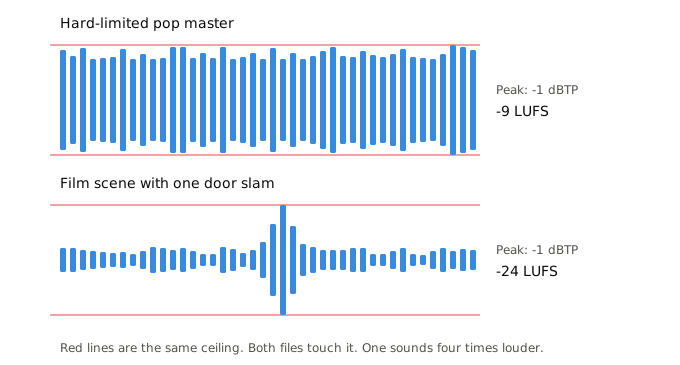
Both files above have identical peaks. One is dense from beginning to end, the other is quiet apart from a single door slam. Peak tells you nothing about which is which, and loudness tells you nothing about whether either is close to clipping, so both numbers have to be set.
True peak differs from the loudest stored sample because the measurement uses the waveform reconstructed between samples. That reconstructed curve can rise higher than either sample, and a playback device reproduces the curve, including the overshoot.
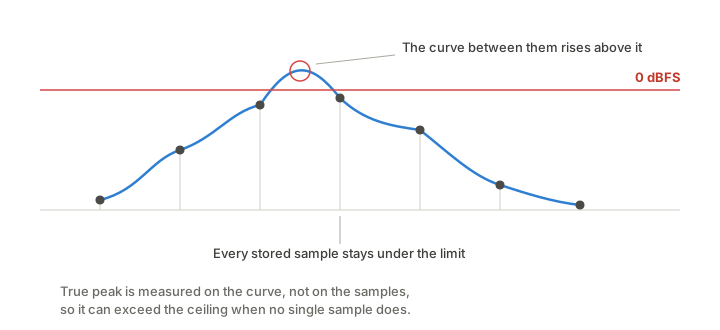
Ceilings therefore sit below zero, leaving room for what happens after the filter has finished. Lossy encoding and sample rate conversion both move peaks around, and a file that measured safely can come out over the limit. EBU R128 uses -1 dBTP and ATSC A/85 uses -2 dBTP.
Most of the time this setting never engages. Correcting a loud source downward moves its peaks away from the ceiling anyway. It matters for quiet sources needing a large upward correction: raising a program from -35 LUFS to -24 LUFS adds 11 dB to every peak as well, and if that would cross the ceiling the limiter clamps the peaks and the loudness target may be missed slightly. The ceiling wins, because audio that clips is worse than audio slightly below target.
dialogueIntelligence
dialogueIntelligenceSelects which parts of the timeline the loudness measurement covers.
| Measures | Suits | |
|---|---|---|
DISABLED | The whole program | Music, and anything without speech |
ENABLED | Everything inside the ranges where speech is detected | Film, drama, news, anything dialogue-led |
For example, the same program encoded both ways, measured over its whole duration:
| DI Disabled | DI Enabled | |
|---|---|---|
| Integrated loudness | -24.1 LUFS | -23.1 LUFS |
| Loudness range | 16.1 LU | 16.0 LU |
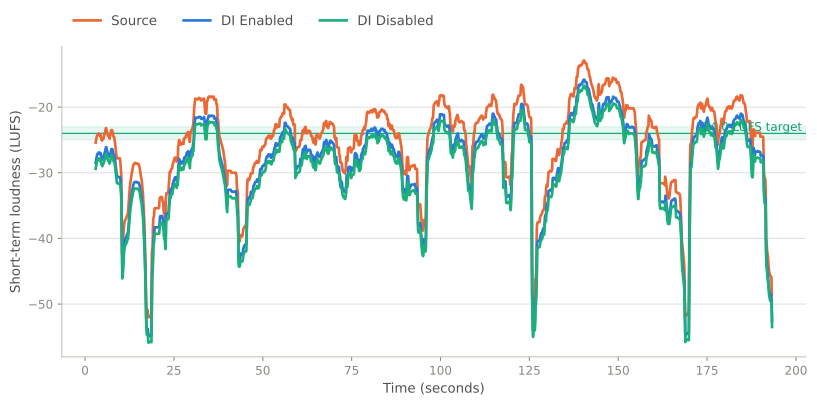
Its speech-bearing segments are about 1 LU quieter than the program as a whole, so ENABLED called for 1 dB less correction. Loudness range is identical, because the correction is one constant gain either way.
To verify a DI Enabled encode, measure a speech section. A whole-program measurement will not return the target because the filter does not apply the target to the whole program.
speechDetectionThreshold
speechDetectionThresholdThe minimum share of the program that must be speech, as a percentage, for speech-based measurement to be used. Below it, the whole program is measured. The examples above use 20, meaning one fifth.
Raise it so that brief speech in a music-led program does not set the level. Lower it for sparse dialogue that should, such as a documentary with long stretches of atmosphere between lines.
The default value is 20%.
contentForm
contentFormLONG, SHORT, or AUTO_DETECT, default AUTO_DETECT. Sets whether relative gating is used when measuring loudness.
Relative gating excludes the quietest parts of a program from the measurement, so pauses and near-silence do not pull the result down. LONG applies it and SHORT does not, which is why the same audio can measure slightly differently under the two settings.
| Value | Content | Gating |
|---|---|---|
LONG | Longer than 180 seconds, such as films and episodes | Relative gating |
SHORT | 180 seconds or shorter, such as adverts and promos | No relative gating |
AUTO_DETECT | The filter detects the content form | Matches the detected form |
Set it explicitly when duration and form disagree, such as a five-minute promo reel that should be measured as short-form.
customData
customDataAdd arbitrary key-value data to the filter. The API returns that data unchanged, and it does not affect encoding. Use it to tag configurations in your own systems.
Checking the result
Measure the encoded output with any tool implementing ITU-R BS.1770. With ffmpeg:
ffmpeg -nostats -i output.mp4 -af ebur128=peak=true -f null - 2>&1 | tail -14Integrated loudness should match the target you set. Because the filter measures the program before correcting it, and then applies a single calculated gain, there is no reason for it to land anywhere else. Expect a tenth of a LU or so of difference and nothing more.
That small residue comes from measuring the encoded file rather than the PCM the filter produced. Lossy encoding alters the signal slightly and the measurement follows. If the gap is larger than a few tenths of a LU, the likely explanation is the peak limiter engaging, which happens when the correction was upward and large.
Notes
This filter modifies the audio itself. If your delivery specification asks for loudness metadata rather than corrected audio, use a Dolby codec and its loudnessControl object instead.
Correction cannot repair clipping that already exists in a source. A master limited hard into the ceiling before it reached you stays clipped afterwards, though pulling the level down does stop anything downstream from clipping again.
Updated 2 months ago