

Using the playlist API for seamless source switching
When switching from one source to the other in the Android Bitmovin Player SDK without the Playlist API, The player doesn't have control over how fast the decoding and rendering pipeline can be reset. While it works well on most devices, unexpected delays or issues can be observed on specific devices with less computing power, leading to issues such as a temporary black screen. To overcome this, we offer the Playlist API for seamless and reliable source switching.
- The decoder and renderer are torn down, which forces the hardware video decoder to be fully released and re-instantiated. On certain devices, the decoder may fail to properly re-attach its output to the
Surface, resulting in issues such as a black screen with audio still playing. - The surface connection is broken. Even when the decoder re-initialization succeeds, disconnecting and reconnecting the surface introduces a window where no frames are being rendered. Depending on devices, the surface may take longer to be torn down and recreated, which may cause some timing issue and in some cases, a persistent black screen.
- Secure codec resource contention. Devices have a limited number of hardware decoder slots. If the previous codec instance hasn't fully released its resources before the new one tries to claim them, the initialization can silently fail.
- The next source is not buffered, which means that upon switching to the next source, the player has to reconstruct the buffer from empty, which may create a few seconds of interruption.
- The DRM transaction adds to the startup time : Each source switch requires a full DRM license negotiation, adding latency before the first frame can be decrypted and rendered.
A better way to switch sources
When using the Playlist API,
- The video pipeline remains active across multiple sources and anticipates the playback of the next source by pre-loading it and negotiating the DRM transactions ahead of time. Since the release 3.147.0 of the Bitmovin Android SDK, this also works when resources are added to the playlist at transition time. This feature is subject to technical limitations (DRM, compatible codecs across sources)
- Content is preloaded for fully gapless & stall free transitions. This is only available for VOD streams at the moment.
- Manifests are pre-loaded, which allows you to get timed metadata across all sources. This requires enabling the preloadAllSources setting of the Playlist configuration.
This allows for a fully gapless transition across sources and makes the workflow more robust against errors.
Workflow
With the playlist API, switching between sources involves 2 steps :
- Adding the next source to the Playlist
- Seeking to the next source (or letting the player start the next source at the end of the current one)
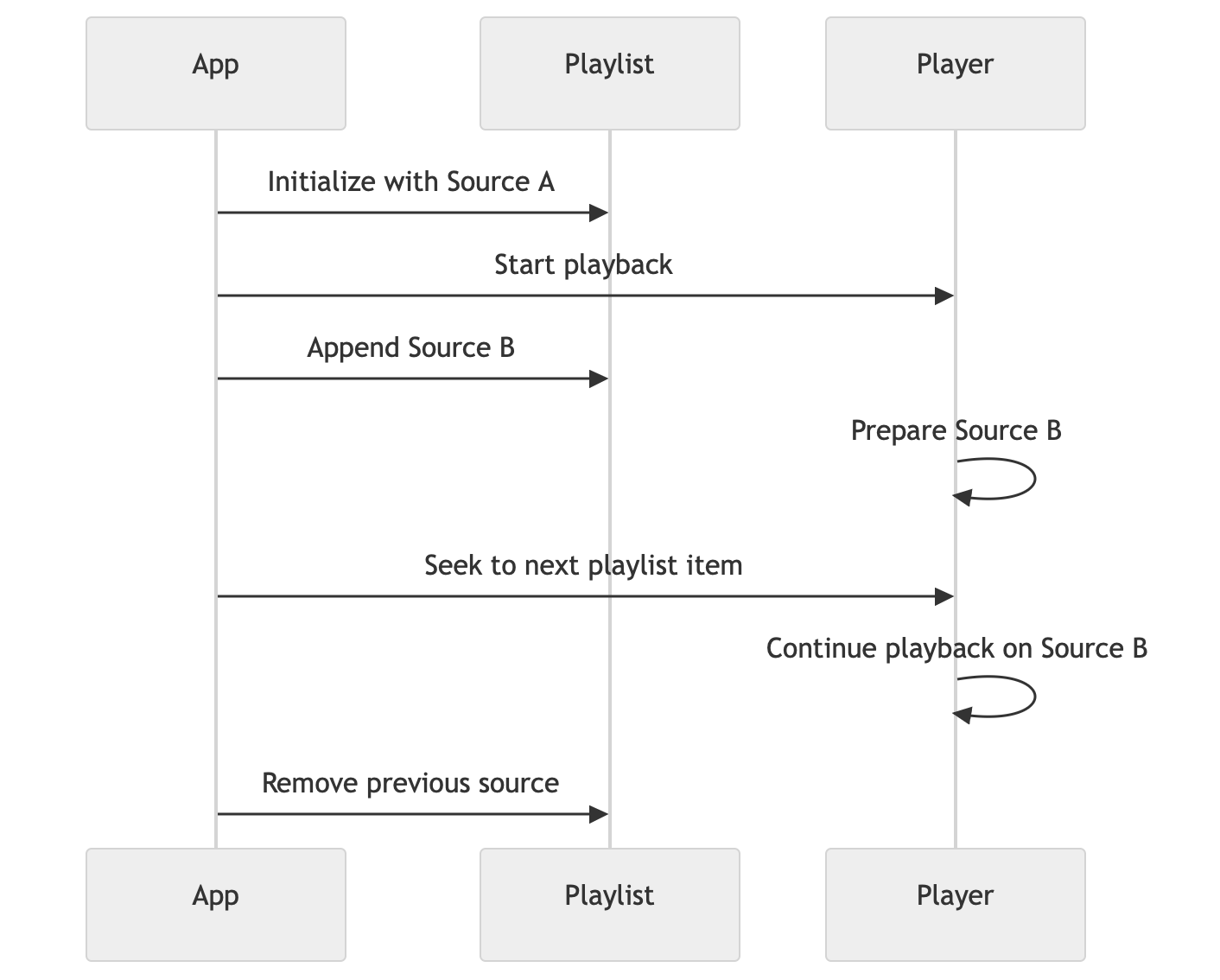
Code example
Let's build an app that switches between 2 sources with 2 different functions. Upon pressing one of the two button, a new source is created and added to the playlist, then the player uses the playlist API to seek to the new source. A PlaylistTransition event handler listens for transitions in the playlist and removes the first source after each transition.
fun onCreate () {
  val first = Source(SourceConfig(url = StreamA, type = SourceType.Hls, title = "Stream A"))
  player.load(PlaylistConfig(listOf(first), PlaylistOptions()))

  player.on\<PlayerEvent.PlaylistTransition> {
    Log.d(TAG, "PlaylistTransition: ${it.from.config.title} -> ${it.to.config.title}")
    player.playlist.remove(it.from)
    Log.d(TAG, "Removed: ${it.from.config.title} (playlist size: ${player.playlist.sources.size})")
}
}

private fun loadStreamA() {
    val source = Source(SourceConfig(url = StreamA, type = SourceType.Hls, title = "Stream A"))
    player.playlist.add(source)
    player.playlist.seek(source, 0.0)
}

private fun loadStreamB() {
    val source = Source(SourceConfig(url = StreamB, type = SourceType.Hls, title = "Stream B"))
    player.playlist.add(source)
    player.playlist.seek(source, 0.0)
}
Live sources
Since the release 3.147.0 of our player, Live sources are supported by the Playlist API. It can allow users to chain Live and / or VOD contents together, and allow seamless switching to and from a live source.
Updated 7 months ago
What’s Next
The Bitmovin playlist API enables many more use-cases. Discover them through our blogposts