

How to control the distance to live edge across SDKs
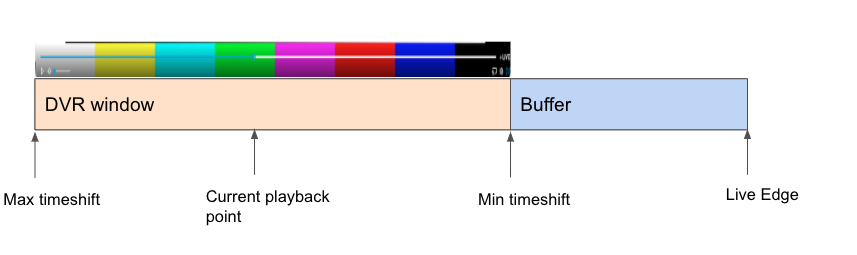
Live streaming is a compromise between getting as close as possible to the live edge, while leaving enough margin for the player to keep a few segments in the buffer in order to provide a reliable experience in case the connection gets disrupted. The closer the player is to the live edge, the smaller the buffer size.
This article only talks about regular live streaming (not low-latency)
Our SDKs provide different options to control how close to the live edge users are.
Web
This can be controller through the buffer configuration.
Example
``var conf = {
  key: "YOUR_KEY_HERE",
  buffer: {
   [MediaType.Video]: {
     [BufferType.ForwardDuration]: 20,
   },
   [MediaType.Audio]: {
     [BufferType.ForwardDuration]: 20,
   },
  },
}
Default forwardDuration : 40s
Android
Android offers both a buffer configuration and a liveEdgeOffset setting the liveEdgeOffset needs to be set in order to control the live edge.
playerConfig.bufferConfig.audioAndVideo.forwardDuration = 20.0;
playerConfig.liveConfig.liveEdgeOffset =  20.0
Default : manifest value
iOS
sourceConfig.liveConfig.targetLatency = 20.0
sourceConfig.liveConfig.automaticallyPreservesLatency = trueDefault : handled by the system.
The system works on a best effort basis but there is no guarantee that the target latency will be always reached exactly. This is especially the case for lower values.
Roku
The system doesn't give control over the distance to live edge.
Recommendations
In cases where the distance to live edge is not critical, we recommend using the default values for each SDKs. In other cases, going below 4x to 6x the segments length is risky in terms of rebuffering rate, especially on Mobile. For instance, if the segment length is 4s, a buffer size below 16s is risky.
In non-low-latency situations, a segment needs to be downloaded fully before being consumed by the player. This means that if the buffer size is 4x the segment length, one segment is being played, one segment is being downloaded, and 2 segments are in reserve in the buffer. Anything less than than would drastically increase the likelihood of rebuffering in case the network speed drops.
To reach lower latencies, having a Low-Latency encoding / CDN setup, as well as the right player settings is recommended.
Updated 5 months ago